 Rebound Retro Studio
Retro cross-development is normally a pile of separate parts: an editor, an assembler you drive from a shell, an emulator you start by hand, and a transfer tool for the real machine. Studio is one window with the parts connected. You write code, build it, and run it — in an emulator on the Mac, or on the machine sitting next to you.
It is deliberately not a general editor with retro plugins. The machines are the product: a project has targets, and a target says which machine, which tool turns source into a program, and where it runs. Everything else hangs off that — the reference pages show the active target's machine, Build uses its tool, Run uses its destination.
What is in there today
- Three machines. Commodore 64, MEGA65, Amiga. C64 and MEGA65 assembly, Commodore BASIC via
petcat, Amiga assembly, and Amiga C through an externalvbccplus the NDK. - The tools it drives, rather than replaces. Kick Assembler, ACME, vasm, vbcc,
petcat; VICE, Xemu and Amiberry for running; and it says which one is missing instead of pretending. - A first-run wizard that finds what you already have installed, names what is absent, and can fetch the pinned versions it was tested against, checked byte for byte.
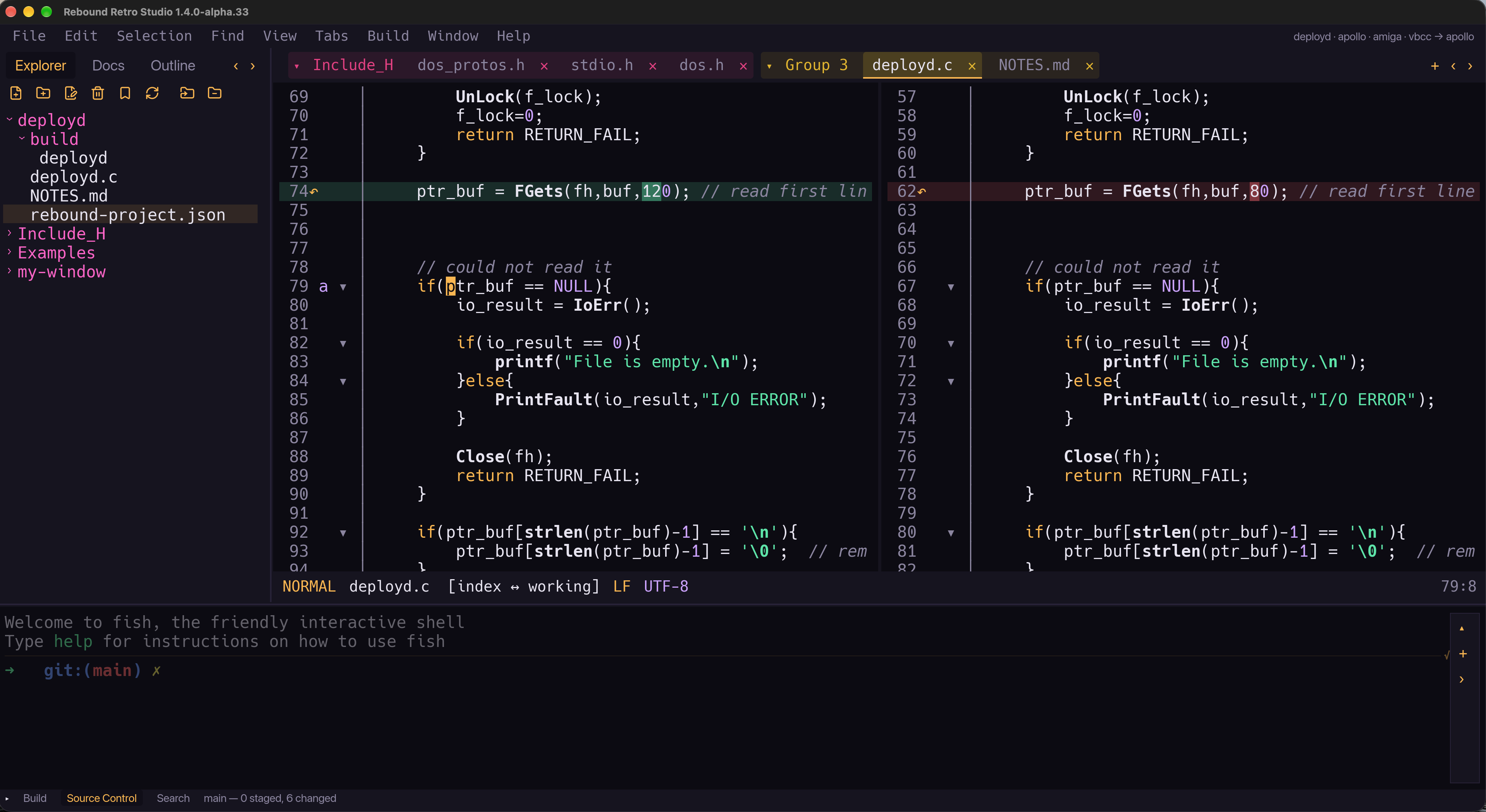
- The editor is Rebound Editor, embedded — two keyboard profiles, one of them Vim.
- A real shell in the bottom band, opened in the project folder. That is Rebound Terminal, embedded the same way.
- File Manager in the shared strip, with project-bound panes and transfer-aware closing.
- Reference pages in the sidebar, and a hover card over a hardware register address: the VIC-II, SID and both 6526 CIAs on the C64, its own I/O window on the MEGA65, the custom chips and both 8520 CIAs on the Amiga. Each toolchain also gets a Reference and a Command Line page.
- A small git panel, hunk-level revert, and a diff view.
Where it actually stands
1.5.0-alpha.4, installed on my Mac on 2026-10-09. Build ▸ Build and Run (⇧⌘R)
joins the separate Build and Run commands. Integration and the release gate are next;
there is no public download here yet.
The earlier 1.4.0-alpha.35 passed an offline first launch on a fresh Mac as a notarized
DMG. That is evidence for that candidate, not a promise that every development build
listed here is a published, notarized release.
The manual is nine chapters written for someone who has never cross-compiled anything, and it is readable here as well as inside the app. Two of its chapters end in tables that Studio generates from its own code at build time — those tables are in the app's copy, not in the one on this site.
Screenshots
What’s next
- Feedback from the first public beta, then the final 1.5.0.
- Studio for Linux follows the macOS release.